
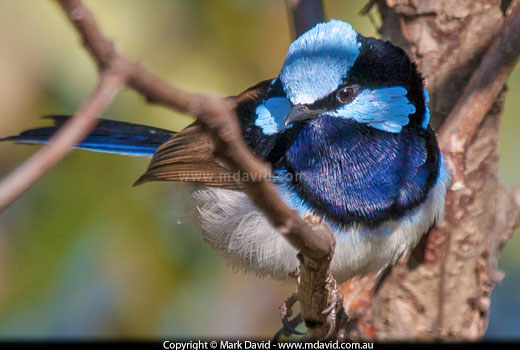
This photo of a Superb Fairy-wren as you see it on this web page is less than one fifth of a megapixel, so a 20 megabyte version of this shot would take up more than a hundred times more space on your screen.
When I bought my first digital camera I had the choice of getting a one-megapixel camera or a two-megapixel version. Despite it costing a fair bit more, I had no hesitation buying the two-megapixel model, because I knew I needed the extra image size that came with the extra megapixels. But that was ages ago, in the days when cameras offered so few megapixels that it actually made sense to buy as many megapixels as you could afford. Now cameras have advanced a whole lot and the salespeople are still telling us we need to get as many megapixels as we can afford. They’re telling us we need cameras with 20 megapixels or more.
The short answer is, no you probably do not.
If you want the best possible image quality, then a bigger sensor is more important than huge megapixel counts. That’s the main advantage digital SLRs have over almost all of the compact cameras.
But sure, if you’re working on high-quality professional gigantic print jobs, or large framed prints, then 20 megapixels or more will be great. And you’ll know if that’s you.
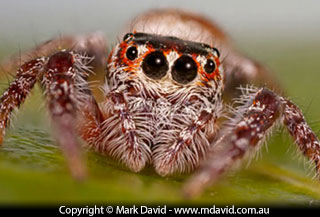
This web version of my jumping-spider pic here comes to less than a fourteenth of a megapixel.
I’ve personally never needed a camera with that much resolution. My current camera (at 18 megapixels) comes close, but when my stuff gets published across a full page in a glossy magazine it has to be reduced in size to fit because the files are just too damned big. And when I print my stuff at home on an A4 printer, anything bigger than about 5 or 6 megapixels is probably overkill.
In fact, if the biggest you ever print something is A4, then once you go past about 8 or 9 megapixels you’re not going to see any difference anyway. That’s because you’d have to be able to see more than 300 pixels/dots per inch, and human eyes just aren’t good enough for that.
A million pixels. So a 1-megapixel photo would be something like 1,200 pixels wide by 900 pixels deep.
1,200 × 900 = 1,080,000. There’s your million.
A 1-megapixel photo is more than big enough for web use and email, but you start to notice its limits when you print it.
For example, if you had your picture published in the print media, then you could expect to see it looking great at roughly the sizes shown in the graphic below. But not much bigger than the sizes indicated below.
If you printed your photo at home, then unless you used an unnecessarily high print resolution, you could expect it to come out at about the same size as it did in the newspaper.
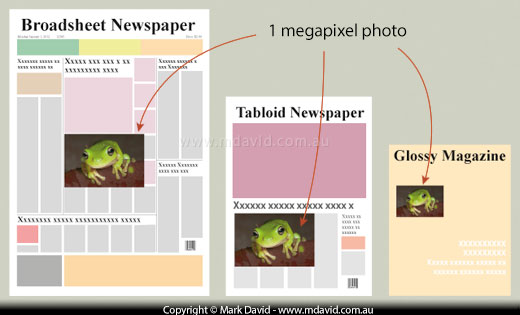
So one megapixel is fine for a smallish print, but if you wanted to stretch it across the whole front page of a broadsheet you’d quickly see its limitations. It would look fuzzy and awful.
But that won’t be a problem, because your digital SLR photos will be a whole lot bigger than just one megapixel.
In the graphic below I show how big a typical 10-megapixel photo would come out in the print media. You’ll see it’s more than big enough for the job. Once again, if you’re printing at home then the sizes shown for the newspaper would serve as a pretty good guide.
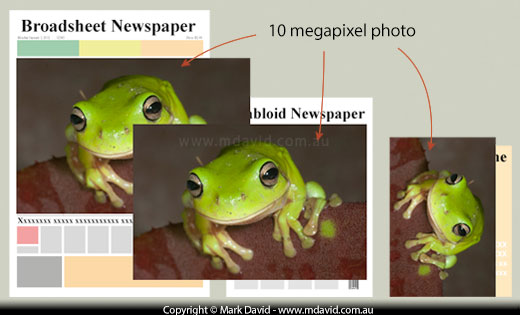
A digital SLR camera now could easily have a lot more than 10 megapixels. In other words, it will create pictures that are way too big for most uses in newspapers or magazines.
What if we want to go big. Really big. Like as big as a billboard?
If a billboard is, let’s say, 24 times bigger than a newspaper, then wouldn’t you need 24 times the resolution? In other words, 240 megapixels?
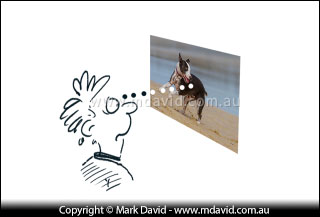
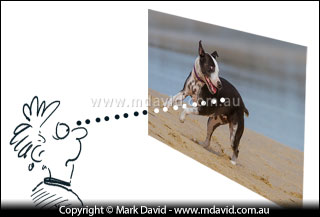
As our pictures get bigger, we tend to stand further away from them. That means we can get away with using the same number of megapixels printed bigger, using more widely-spaced dots of ink.
The answer is no. Or at least, not unless you intend to view the image from the same distance as you read a book (less than your arm’s length away from your face). You see, the bigger the images, the further back we tend to stand to view them. And the further back you stand, the bigger you can make the dots of ink and the more you can space out those dots of ink out too without us noticing them. The result is that we don’t need those super-sized resolutions.
Sometimes photographers only want to print part of a photo. So they might start with a 12-megapixel picture, chop off half of it (crop it) and they’re left with 6 megapixels, which will still have enough resolution to print a nice A4 image.
Of course, that’s assuming their photographic equipment and technique was pretty good, because if there’s any motion blur or some other fault in the original photo, then it’s suddenly going to be a whole lot more noticeable after they’ve cropped the image and filled the page (or screen) with whatever they have left.
So for most of us, the opportunity to crop heavily is the main reason we’d want to go higher than about 10 megapixels.
Well, yes and no.
More pixels means you have the luxury of more to throw away if you need to crop. And of course, the pros and some of the fine-art photographers working on large-format super-high-quality prints just might need the big pixel counts.
Also, more megapixels will allow you to capture more of the fine detail in a scene.
The ‘no’ reasons can be broken up into groups:
More megapixels means a more expensive camera.
More pixels means bigger files sizes, and that means:
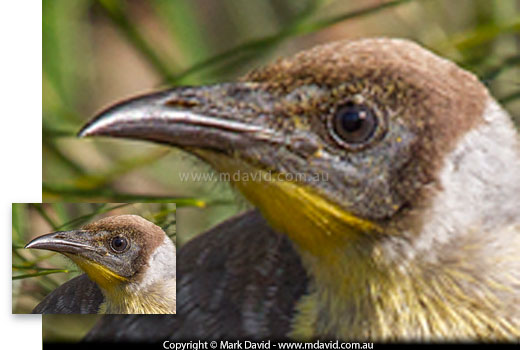
The small bird picture has been stretched to use up more pixels. So does more pixels mean better image quality? Nope. The truth is that the result is a blurry bird that very closely simulates just some of the problems you get when a camera has many more megapixels than its combination of sensor and lens can resolve properly.
Even under ideal conditions, many lenses struggle to resolve enough detail to exceed what 10-15 megapixels can record. That’s one of the reasons why professionals with their high-end cameras spend several thousands of dollars extra on high-end lenses.
Assuming your lens is good enough to capture detail for some of the more extreme high-megapixel camera sensors, then much of what it would capture would be the kind of microscopic camera-shake blur that we never captured in the lower megapixel counts.
Sure, with better camera technique you should be able to eliminate that blur. But be aware that the extremely high megapixel counts will be much more demanding to use if you want to make full use of them.
I’ll use some very rough numbers here.
Since the sensor in your typical digital SLR is only about a square inch in area, that means each pixel in a 10-megapixel camera’s sensor must be about a ten-millionth of a square inch.
That’s insanely small. In fact it’s barely enough area for capturing sufficient photons for a meaningful sample of light.
So when a pixel in your sensor gets too tiny, it mightn’t capture enough light to do the job properly. Instead of registering a green pixel for an area of grass, it might bungle things and record a red pixel instead. Your photo starts getting speckled with pixels of the wrong tone. That speckling is called noise and too much of it does bad things to photos. And the more megapixels you have, the smaller those sensor pixels are going to have to be to fit them all in.
Can you see now, how too high a megapixel count can sometimes result in worse image quality?
It’s why compact cameras, which are notorious for having crazy-small sensors combined with unrealistically high megapixel counts, produce noisy photos. Some of those compacts would get better image quality if they had fewer megapixels!
It doesn’t take a genius to see there are more ‘no’ reasons than ‘yes’. Or in other words, more hassles than benefits with giant megapixel counts.
Serious professional photographers and some fine-art photographers sometimes need to capture very high resolution images and if that’s what they want then good luck to them. But for everyone else including me, my opinion is that you don’t need to worry about it — chances are your camera will have more megapixels than you need already. You probably won’t need much more than about 10 or perhaps 15 megapixels. That will let you crop your photo down to about 6 megapixels, which is chopping quite a lot off your photo when you think about it, and it can still look great in print and be much more than enough to look great on screen.
Like I said earlier, my current camera captures 18 megapixels. I like having 18 megapixels because it lets me crop my images and still retain a lot of sharp detail in sufficient size to print on a decent-sized magazine page.

At full resolution this photo is a huge 46 megapixels. I made it by taking a bunch of overlapping pictures of one extremely cooperative moth and stitching them together. The result is a monster file capturing the kind of detail even moths probably don’t know about. I did this for fun (my fun — probably not as enthralling for the moth), but the resulting image is way too big for any of my printing needs, and there’s no way I can see it full size on my computer monitor either.
However, when I want to print photos at home or give friends 4 × 6 inch prints, then suddenly I have far more resolution than I need. If I wasn’t selling high resolution pictures to magazines then a 10-megapixel camera would probably be enough. In fact, if you don’t need to crop your images (because you frame your images better at the time you take them) then a 6-megapixel image will have enough resolution to look great printed up to A4. When I mentioned earlier that 8 or 9 megapixels was about as much detail as you can realistically print on an A4 page I was talking about the maximum resolution in what our eyes can see.
I don’t want to tell you not to get a high-megapixel camera if that’s what you plan to do, because you know better than me what kind of work you like.
Perhaps what I really want to do here, is to let you know that if some camera marketing campaign is pestering you to max out your credit card on getting more megapixels, then maybe you can sit back and be happy knowing you probably already have more than you need. The camera manufacturers want you to buy a new camera every year. I mean, of course they do. And one of the ways they try to get you to do this is by boasting about megapixels.
One thing the camera marketers don’t want us to know is that pretty much any digital SLR these days is good enough to take outstanding prize-winning photos, with enough resolution to look fantastic printed up to A4 size and hanging on your wall. Digital SLR cameras have bigger sensors than the compacts, and that’s more important for image quality than monstrous megapixel counts.
On those rare occasions when you need super-high resolution, consider the option of taking a few photos in a panorama and stitching them together in your image-editing software.
I wrote this piece some years ago, and since then, sensor engineers have been busy.
Although I think my main arguments are still valid, we are now seeing excellent results from sensors that previously would have been considered too small to be effective. So, while this article was hopefully on target in its time, I think it needs a revision today. For example, mobile phone cameras have been getting images far better than their tiny sensors could be expected to produce, although with phones I suspect (but don’t know for certain) that sneaky algorithms enhance the images before you get to see them.
But what about the sensors in DSLR and mirrorless cameras?
Since DSLRs are slowly being phased out by mirrorless, then the rest of this update will refer only to mirrorless.
Keyboard warriors have become perhaps a little too fixated on the “size is everything’ approach to sensors and I’m seeing this bias affect the reputation of micro four thirds systems especially. Micro four thirds cameras use sensors smaller than those found in full frame or APS-C and so the traditional belief was they could never work to the standards required of professionals. But I don’t agree with that. I have worked side by side with a user of a micro four thirds Olympus mirrorless camera and the results he gets can be as good as I get on my full-frame 45 megapixel mirrorless camera. My full-frame camera would have been picking up extra stuff around the sides of the frame that his smaller sensor was cropping, but the subject and fine detail in the centre of the frame was recorded equally well in both cameras. Does that mean I bought the wrong camera? No. I’m happy with my camera. But it does mean that the assumption that smaller sensors are no good is wrong, if the sensor has been engineered properly and the camera is handled by someone who knows what they’re doing. So, when OM System (formerly Olympus) released their new OM-1 camera the usual armchair “experts” went feral about the camera “only” having 20 megapixels. I would argue that if you know what you are doing then using one of those cameras could achieve fantastic results, and all without the hassles of carrying the heavy camera gear of other photographers. This is not an attempt to get you to buy camera gear. This is only an attempt to quieten the noise being made about megapixels.
And what about mobile phone cameras?
Well, they are super-convenient because they are always with you, and extremely capable. But until they can find and hold focus on the eye of a bird flying past while zoomed in at 500mm equivalent then I’m still reaching for my regular camera.
Copyright © Mark David. All rights reserved


