Photography mdavid.com.au

Digital SLR photography — Understanding exposure compensation

Modern digital cameras do a great job at getting the exposure right — most of the time. Here’s how to get great shots the rest of the time.

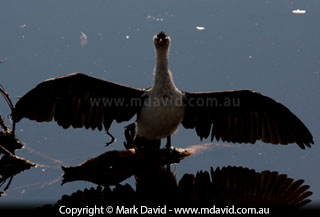
Underexposed photo taken in bright sunlight

In this shot, the camera’s automatic exposure got confused by an extremely bright sky, resulting in a badly underexposed image. To take a better shot, all you have to do is use a bit of exposure compensation.

Why your camera sometimes gets it wrong

Imagine everything you saw around you was made of paint. Scoop up all that paint and stir it up, and the resulting gooey mix would most likely turn out to be a boring mid-toned grey.

That’s pretty much how your camera thinks. It samples the amount of light and dark it ‘sees’ in a scene and assumes that when everything gets mixed and averaged out the result should be not too dark, not too light. Just a neutral grey. If it averages out lighter than that, then it decides there’s too much light coming through the lens and so it reduces the exposure. And if things average out into a dark tone then it increases the exposure.

Because most scenes contain a balanced mix of light and dark objects, this averaging-out method works pretty well and that’s why the exposure will be pretty much right, more often than not. But what if you’re photographing a scene that only has light-toned things in it? Like for example, a white rabbit on snow.

correctly exposed shot of a bird using exposure compensation

Okay, so exposure compensation fixed the underexposure problem from that picture at the top of this page. But the colours look kind of washed out. Now, what could be causing that?


The camera will ‘see’ white, white and more white and when it averages that all out, it ends up with, you guessed it: white! It decides that just can’t be right because it’s been programmed to think everything should average out into mid-toned grey. So it reduces the exposure. The result will be a photo that is badly underexposed, with a grey rabbit against grey snow. Now the camera’s happy, but you’re not.

How to fix it

The good news is your digital SLR (and some of the smarter compacts) will most likely have a function called exposure compensation.

At this point you’ll need to look at your camera’s manual to find out how to activate it. Once you know how to turn on that setting in your particular camera, here’s what you do with it.

First of all, you’ll see that exposure compensation is measured in ‘stops’. Stops is a word that refers to your aperture settings.

If your camera keeps making things too dark, you increase your exposure by setting your camera’s Exposure Compensation to a positive number of stops.

And if you want to decrease your exposure (make things darker) you set it to a negative value.

Usually, one stop will make a world of difference to your photo and you can test if you need more or less by taking a shot and glancing at your histogram. If you need help on histograms, a guide to understanding them can be found here.

With a bit of practice in photography, you’ll soon start noticing the kinds of situations where your camera is likely to get things wrong, when exposure compensation is needed. The examples below illustrate some of the things to look out for.

Extremely bright background

underexposed shot of a Little Pied Cormorant

Here’s how the camera exposed the photo of this Little Pied Cormorant at its default (automatic) setting. It is clearly very underexposed.

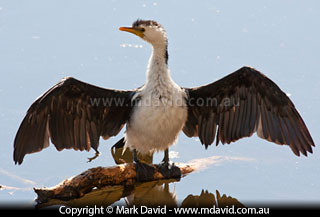
properly exposed shot of the same bird

… and here’s how the same scene photographed with +2 stops of exposure compensation. While I was adjusting the camera the bird was also kind enough to turn its head slightly, which improved the shot a little more.

When I saw the Little Pied Cormorant shown at right it was an auto-exposure nightmare. Not only was the bird back-lit, meaning that the part of the bird I could see was in shadow, but sunlight was reflecting right off that water behind it, throwing up a huge amount of glare. That bright glare was going to play havoc with the camera’s automatic exposure settings. Leaving the camera with its default settings would have given me the underexposed photo shown at right.

Now, I could perhaps have used a flash to light up the front of the bird, but the bird was a long way away and my flash was an even longer way away (at home). I knew the little pop-up flash on the camera wouldn’t be enough.

So I set Exposure Compensation to +2 stops. The result was the next version shown here, where the water is now pushed almost to white, and the bird is correctly exposed.

What to look out for

A glaring bright sky background or glare reflected behind your subject, is a sure sign you need to either use a fill flash or turn to exposure compensation.

The theory

All that glare in the water should be near-white. I mean, that was the way my eyes saw it. But the camera would have wanted to turn it into a much darker mid-tone when it tried to average everything out. So I needed to brighten things back up again. That’s why I used a positive Exposure Compensation setting.

Bringing out the detail in a white texture

When an area of white texture is hit by bright sunlight, the camera will often ‘blow out’ the detail, which is to say it over-exposes the shot so badly that big chunks of the image go completely white, with no image detail captured at all. Once an area of white is overexposed that much then no amount of pulling levers in your image-editing software is going to get that detail back. So at times like that, it can be a good idea to deliberately underexpose your shot a little.

properly exposed shot of a pelican

So in this picture of the pelican, I didn’t want to lose that lovely white feather texture so I set my camera’s exposure compensation to minus one third of a stop. Thanks to that setting, those feathers turned out really well, as you’ll see in the enlarged section.

What to look out for

An area of textured white area within a scene dominated by darker tones

The theory

I didn’t want blown-out white areas in my photo and so, when confronted with a bird that had so many white feathers, I deliberately underexposed the shot slightly.

How do you know if you should make things darker or lighter?

The easiest way is to take a test shot and see how it looks. Checking your histogram if often a good idea too.

However, a very general bunch of guidelines are:

Too confusing? Then just fire off that test shot and work your way from there. You’ll quickly get a feel for this kind of thing.

Photography

Beginners’ series on digital SLR photography

THE ESSENTIAL BASICS

Getting started with digital SLRs
A quick guide to understanding your new toy

Learning from examples
Picking up where the first article left off


UNDERSTANDING YOUR CAMERA

Megapixels
How many is enough?

Understanding histograms
Making sense of this handy tool

APS-C vs full frame
The differences explained, and what it means to your photography

Fast lens, slow lens
What’s the difference?

How much camera gear do you need?
Sometimes, less really is more


COMMON PROBLEMS AND THEIR SOLUTIONS

Washed-out colours in photos
Why it happens, and how to prevent it

Understanding Exposure Compensation
Why your photo subject can look so badly exposed, and what to do about it

newGetting sharper pictures
Understanding the things that stop your photos from being tack-sharp

Noise in your images
What causes it, and what can you do about it?


TAKING THINGS FURTHER

Using a telephoto lens to blur the background
Here’s an easy-to-understand explanation of why it happens

Macro photography part 1
Using your DSLR for bug shots

Macro photography part 2
Ironing the bugs out of bug shots

One simple trick
The easiest way to get better wildlife photos

Bird photography part 1
Small, distant, and feathered does not have to mean a bad photo

Bird photography part 2
More hints for beginner bird photographers

Using software to ‘fix’ your photos
A few suggestions for image editing

newImage Stacking
Using software to achieve extraordinary Depth of Field


Other photography stuff

PHOTO SALES

Photo Library
Pics of Australian critters


BLOG (sort of)

The elusive waterskiing duck
It started out as a fun idea …

AN UNHELPFUL GUIDE

Wildlife photography — this guide will not make you into a better photographer
Page 1 | Page 2 | Page 3

Great moments in Nature Photography (Not)
When okay shots meet bad timing


Copyright © Mark David. All rights reserved